[RTL8722CSM] [RTL8722DM] Display Images On E-Paper
Materials
Ameba x 1
Waveshare 2.9inch e-Paper HAT (D) x 1
Example
In this example, we use the Ameba RTL8722 module connects to a Waveshare
2.9inch e-Paper module to display a few QR codes. The display uses the
flexible substrate as a base plate, with an interface and a reference
system design. The 2.9” active area contains 296×128 pixels and has
1-bit white/black full display capabilities. An integrated circuit
contains gate buffer, source buffer, interface, timing control logic,
oscillator, etc… are supplied with each panel. You may refer to the
official 2.9inch e-Paper HAT (D)
datasheet to
know more information about this module. Front view of the e-Paper
Module: RTL8722 wiring diagram: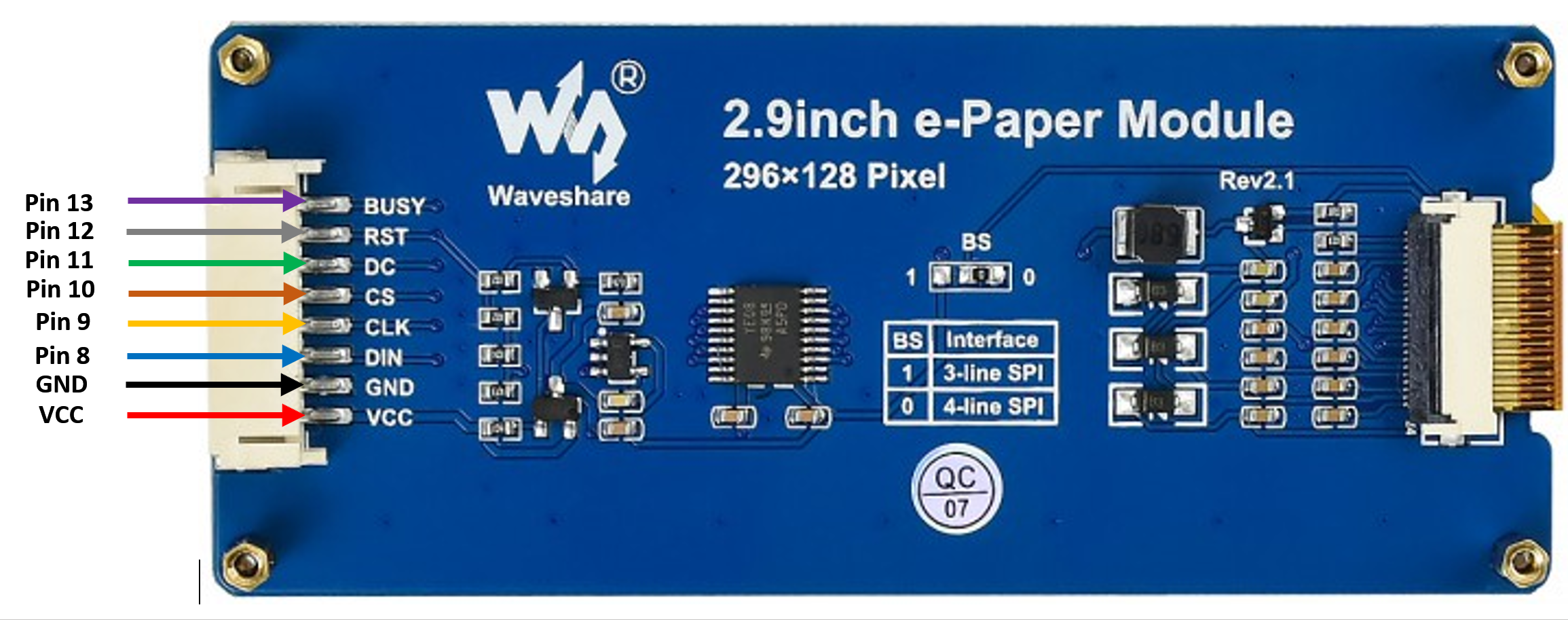
 Firstly, you need
to prepare a picture/photo in the format of 296×128 pixels. We can
easily find a photo resizing tool online, for example, the Online Image
Resizer. Following the instructions on the
website, then download the generated image in JPG format. Secondly, we
use
the Image2LCD tool
to transfer the downloaded 296×128 image into hexadecimal codes. You can
visit
this YouTube link
to get detailed instructions. Then we move to the coding part for this
example. First, make sure the correct Ameba development board is
selected in Arduino IDE: “Tools” -> “Board” -> “RTL8722CSM/RTL8722DM”.
Then open the “DisplayQR” example in “File” -> “Examples” -> “AmebaEink”
-> “EinkDisplayImage “:
Firstly, you need
to prepare a picture/photo in the format of 296×128 pixels. We can
easily find a photo resizing tool online, for example, the Online Image
Resizer. Following the instructions on the
website, then download the generated image in JPG format. Secondly, we
use
the Image2LCD tool
to transfer the downloaded 296×128 image into hexadecimal codes. You can
visit
this YouTube link
to get detailed instructions. Then we move to the coding part for this
example. First, make sure the correct Ameba development board is
selected in Arduino IDE: “Tools” -> “Board” -> “RTL8722CSM/RTL8722DM”.
Then open the “DisplayQR” example in “File” -> “Examples” -> “AmebaEink”
-> “EinkDisplayImage “: Upon successfully upload the sample
code and press the reset button, you need to wait for around 1~2 seconds
for the e-Paper module to fresh its screen. Then the screen will start
to display an image for 5 seconds first, then 3 different QR codes will
be displayed every 5 seconds (showing in the screenshot below, y may
scan the QR codes and find out more information if you wish to). Lastly,
a gif in which forms of 3 frames will be displayed for a few
seconds.
Upon successfully upload the sample
code and press the reset button, you need to wait for around 1~2 seconds
for the e-Paper module to fresh its screen. Then the screen will start
to display an image for 5 seconds first, then 3 different QR codes will
be displayed every 5 seconds (showing in the screenshot below, y may
scan the QR codes and find out more information if you wish to). Lastly,
a gif in which forms of 3 frames will be displayed for a few
seconds.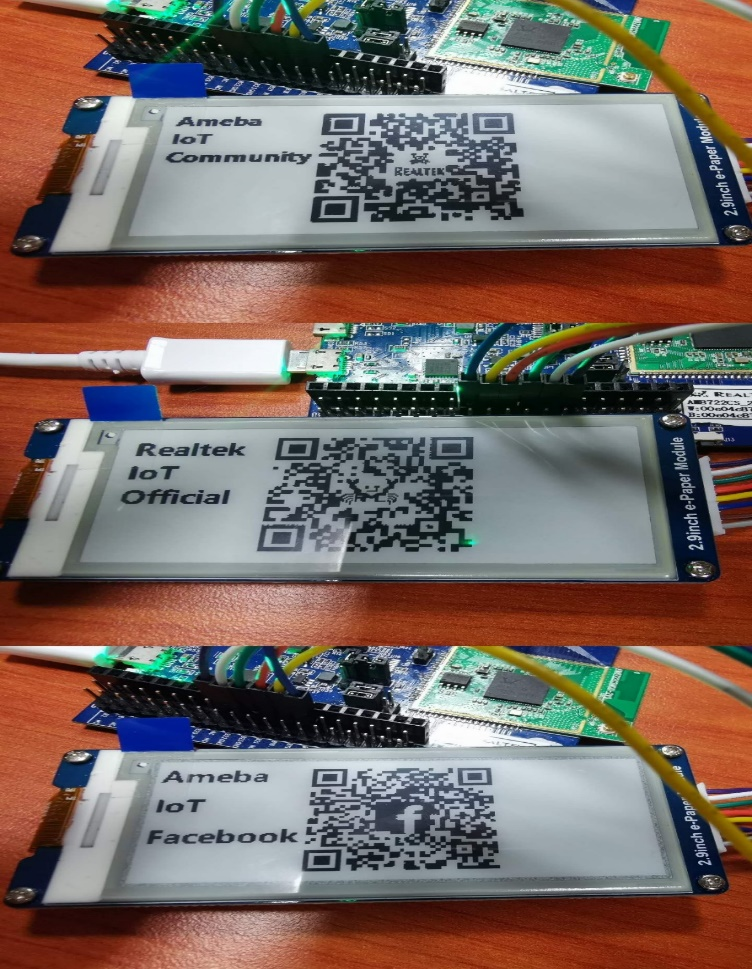
Code Reference